
In today’s digital-first business world, your email signature is often the last impression you make on a recipient. Yet many professionals overlook this crucial element of their brand identity. A well-crafted email signature isn’t just a formality—it’s a powerful marketing tool, a trust builder, and a reflection of your professionalism. Let’s explore why email signatures matter and how you can create professional ones without spending a dime.
Why Email Signatures Are Essential for Your Business
Building Immediate Trust and Credibility
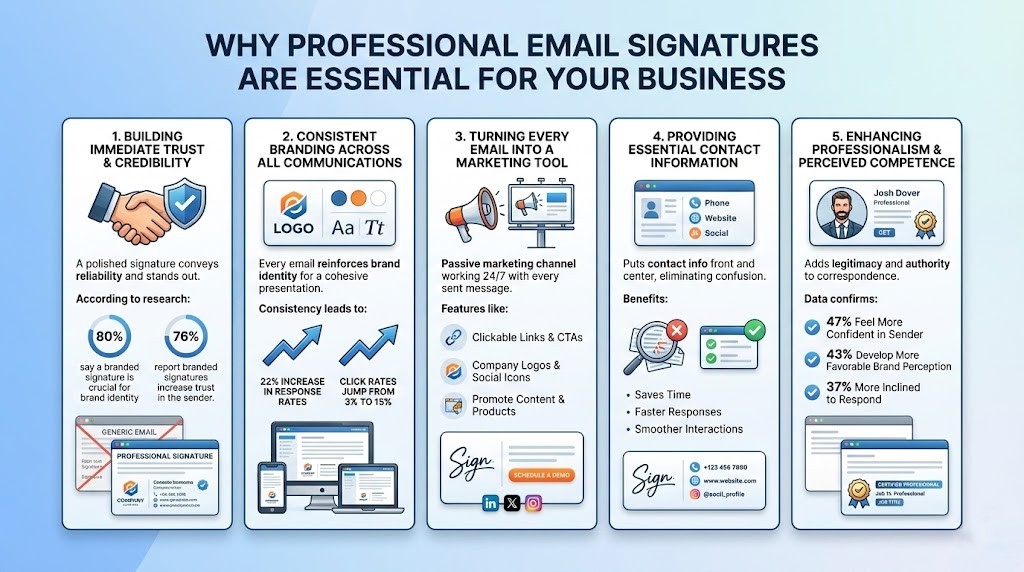
Your email signature is often the final element a recipient sees before they decide how to respond to you. A professionally designed signature conveys credibility, attention to detail, and organization, making your message stand out rather than get lost in the spam folder. According to recent research, 80% of people say a branded email signature is an important aspect of a company’s brand identity, while 76% report that branded signatures increase their trust in the sender.
When recipients see a polished, professional signature with consistent branding, they’re more likely to perceive your company as reliable and legitimate. This is especially critical when communicating with potential clients, partners, or investors who may be evaluating your company for the first time.
Consistent Branding Across All Communications
One of the most powerful benefits of a professional email signature is brand consistency. Every email your company sends is an opportunity to reinforce your brand identity. By using consistent logos, colors, fonts, and messaging in your signatures, you ensure that all communications maintain the same visual identity and professional appearance.
This consistency matters more than you might think. Businesses that adopt consistent email signatures see a 22% increase in email response rates and their click rates to websites jump from 3% to 15%. A cohesive brand presentation across all channels—especially email—signals to customers that you’re an organized, trustworthy company.
Turning Every Email into a Marketing Tool
Your email signature is a passive marketing channel that works in the background with every message you send. Consider how many emails your team sends daily—each one is an opportunity to drive traffic to your website, promote new products, or encourage social media engagement.
With features like clickable links, company logos, social media icons, and calls-to-action (CTAs), your email signature can serve as a miniature marketing billboard. Unlike traditional advertising that stops when you stop paying for it, email signatures work 24/7 across every outgoing message, making them an incredibly cost-effective marketing investment.
Providing Essential Contact Information
A well-structured email signature puts your contact information front and center, eliminating confusion and streamlining communication. Recipients don’t have to search through previous emails or external sources to find your phone number, website, or social media profiles. This convenience saves time for both you and your recipients, facilitating faster responses and smoother business interactions.
Enhancing Professionalism and Perceived Competence
Email signatures that include job titles, company names, professional certifications, and credentials add a layer of legitimacy to your correspondence. This added professionalism is particularly important when you’re establishing authority in your field or building relationships with high-value prospects.
The data confirms this: when people receive emails with professional signatures, 47% feel more confident in the sender, 43% develop a more favorable perception of the brand, and 37% are more inclined to respond to the email.
Best Practices for Creating an Effective Email Signature
Essential Elements to Include
Every professional email signature should contain the following core information:
- Full Name: Make it prominent, often slightly larger or bolded
- Job Title: Clearly state your role or position
- Company Name: Include your organization’s official name
- Primary Contact Information: Phone number and professional email address
- Website Link: Direct recipients to your main domain
- Company Logo: Enhance brand recognition and visual identity
Building Immediate Trust and Credibility
- Full Name: Make it prominent, often slightly larger or bolded
- Job Title: Clearly state your role or position
- Company Name: Include your organization's official name
- Primary Contact Information: Phone number and professional email address
- Website Link: Direct recipients to your main domain
- Company Logo: Enhance brand recognition and visual identity
Optional But Powerful Elements
Beyond the basics, consider adding these elements to maximize your signature’s impact:
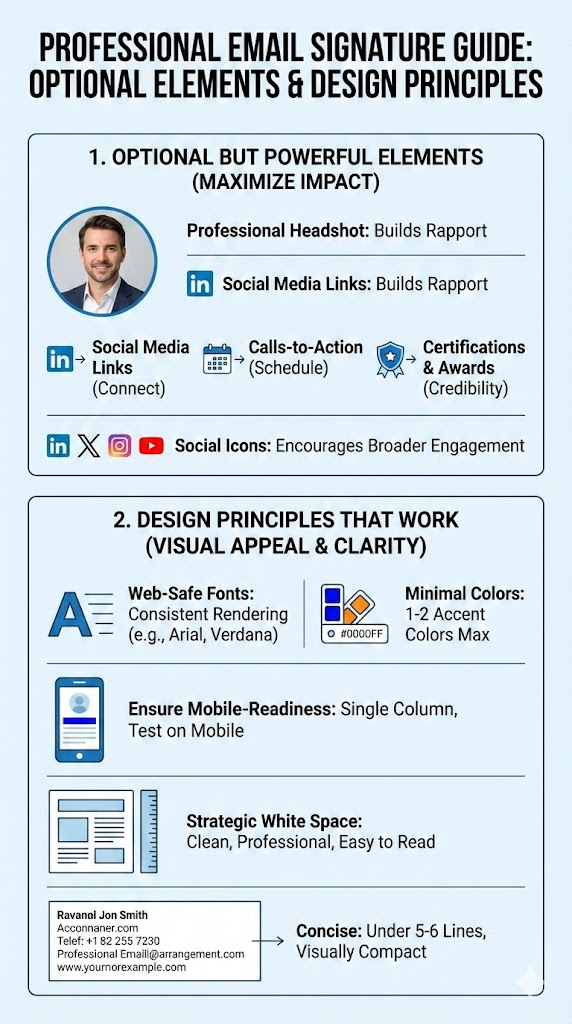
- Professional Headshot: A high-quality, professional photo helps build rapport and trust, especially for client-facing roles. This human element makes you more relatable and memorable
- Social Media Links: Include LinkedIn and other professional networks where your audience congregates
- Calls-to-Action (CTAs): Direct recipients to specific actions, such as scheduling a demo, visiting your blog, or subscribing to your newsletter
- Brand Certifications or Awards: Showcase achievements that build credibility
- Social Icons: Visual links to your social media profiles encourage broader engagement
Design Principles That Work
Creating a visually appealing signature requires attention to design fundamentals:
Use Web-Safe Fonts: Stick to fonts like Arial, Verdana, or Georgia that render consistently across all email clients. Avoid fancy, decorative fonts that may not display properly.
Keep Colors Minimal: Use your brand’s hex codes sparingly—one or two accent colors maximum. Excessive colors make your signature look unprofessional and distract from the message.
Ensure Mobile-Readiness: Over 60% of emails are opened on mobile devices. Your signature must look good on small screens, which means:
- Use a single-column layout
- Avoid horizontal layouts with multiple logos
- Test your signature on mobile devices before using it
- Include alt text for images in case they don’t load
Use Strategic White Space: Adequate white space makes your signature clean, professional, and easy to read. Don’t cram information into a cluttered design.
Keep It Concise: Aim for a signature that’s visually compact without sacrificing essential information. A good rule of thumb is to keep it under 5-6 lines for the main information.
Different Signatures for Different Contexts
An important but often overlooked best practice is using different signature versions:
- Full Signature: Use the complete version with logo, CTA, and social links in initial emails to new contacts
- Condensed Signature: For replies and forwards within a thread, simplify to just your name and contact line. This prevents your signature from dominating email threads and making them look cluttered
How to Create a Professional Email Signature for Free
Creating a professional email signature doesn’t require expensive software or design expertise. Here’s a step-by-step guide to creating one using free tools:
Step 1: Gather Your Information
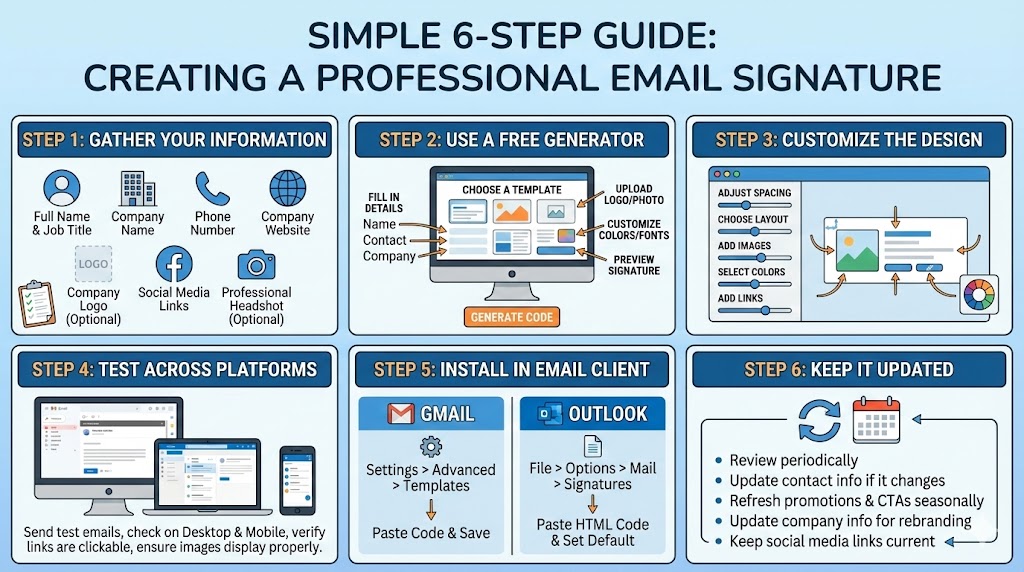
Before you start, compile all the information you want to include:
- Full name
- Job title
- Company name
- Phone number
- Company website
- Company logo (if available)
- Social media links
- Professional headshot (optional but recommended)
Step 2: Use a Free Email Signature Generator
Online email signature generators make the process incredibly simple. These tools provide pre-designed templates and intuitive interfaces that eliminate the need for coding knowledge. Here’s what to do:
- Visit a free email signature generator tool
- Select a template that matches your brand style
- Fill in your information in the provided fields:
- Name and job title
- Company details
- Contact information
- Add your company logo and any images
- Customize colors and fonts to match your brand (if the tool allows)
- Preview how your signature will look
- Generate the HTML code or copy the signature to your email client
Step 3: Customize the Design
Most generators offer customization options:
- Adjust Spacing: Ensure proper padding between elements so nothing feels cramped
- Choose a Layout: Decide whether to arrange information in a single column or with the logo on the side
- Add Images: Upload your company logo and professional headshot if available
- Select Colors: Use your brand colors, but keep the palette minimal
- Add Links: Include clickable elements for your website, social media, and phone number
Step 4: Test Across Email Platforms
Email clients render HTML differently, so it’s crucial to test your signature:
- Send test emails to yourself using Gmail, Outlook, and other platforms you use
- Check how it appears on desktop and mobile devices
- Verify that all links are clickable
- Ensure images display properly
Step 5: Install in Your Email Client
Most email signature generators provide code that you can copy directly into your email settings:
For Gmail:
- Go to Settings > Advanced > Templates
- Compose a new email
- Paste your signature code into the message body
- Name the template with your signature name
- In Settings > General, set this template as your default signature
For Outlook:
- Go to File > Options > Mail > Signatures
- Create a new signature
- Paste your HTML code (Outlook supports HTML signatures)
- Choose to use this signature by default
For Other Email Platforms: Check your email provider’s documentation for signature settings, usually found in Settings > General or Settings > Mail Preferences
Step 6: Keep It Updated
Review and update your email signature periodically:
- Update contact information if it changes
- Refresh promotions and CTAs seasonally
- Update company information if your organization rebrands
- Keep social media links current
Making Your Email Signature Effective: Pro Tips
1. Don’t Overload Your Signature
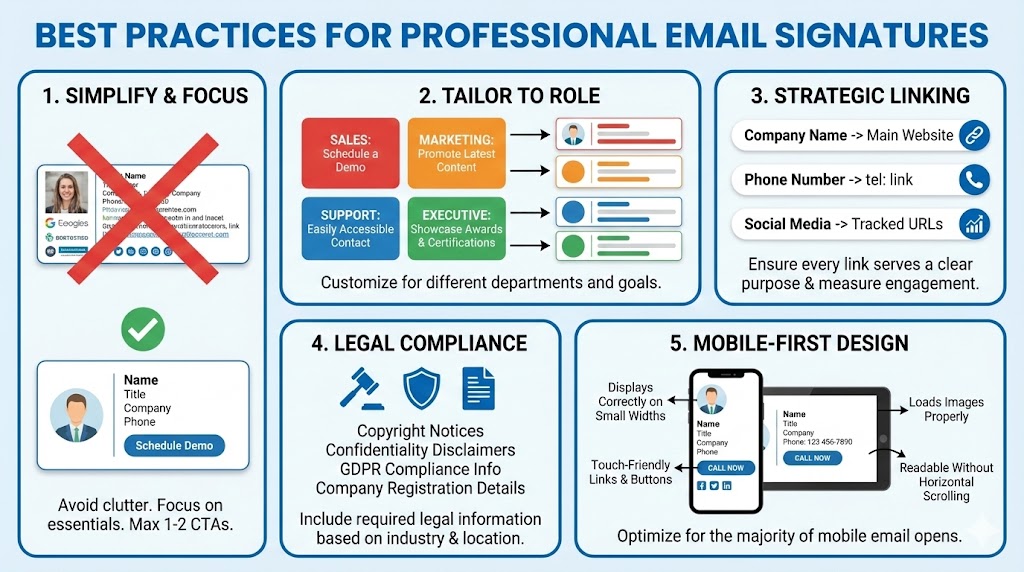
While your signature is a marketing tool, resist the urge to cram every piece of information into it. A cluttered signature dilutes your message and looks unprofessional. Focus on essentials and one or two CTAs maximum.
2. Use Your Signature for Multiple Purposes
Your email signature can serve different functions for different departments:
- Sales Team: Include a prominent “Schedule a Demo” button
- Marketing Team: Promote your latest blog post or event
- Support Team: Make contact information easily accessible
- Executive Team: Showcase awards and certifications
3. Make Links Count
Every link in your signature should serve a purpose:
- Link your company name to your main website
- Link your phone number to initiate a call (tel: links work great)
- Use tracked URLs for social media links to measure engagement
4. Consider Legal Requirements
Depending on your industry and location, you may need to include:
- Copyright notices
- Confidentiality disclaimers (especially for legal or financial services)
- GDPR compliance information
- Company registration details
5. Mobile Optimization is Non-Negotiable
Since the majority of emails are now opened on mobile devices, ensure your signature:
- Displays correctly at small widths
- Has touch-friendly links and buttons
- Loads images properly
- Maintains readability without horizontal scrolling
The Bottom Line
Your email signature is more than just a digital business card—it’s a powerful tool for building trust, reinforcing your brand, and driving business growth. By creating a professional, consistent email signature, you’re making a statement about your company’s credibility and attention to detail.
The best part? You can create an impressive, professional email signature completely for free using online signature generators. No design skills, no expensive software, and no technical knowledge required.
Start today by gathering your information, choosing a free email signature generator, and implementing a professional signature across your organization. With every email you send, you’ll be subtly reinforcing your brand, building trust with recipients, and turning a simple signature into a powerful marketing asset.
Your professional image deserves a professional email signature. Make yours count.
FAQs (Frequently Asked Questions)
Why is an email signature essential for business?
An email signature is essential because it is a powerful tool for building immediate trust and credibility, ensuring consistent branding across all communications, and turning every email into a passive marketing tool by including CTAs and links.
What are the essential elements that should be included in a professional email signature?
The essential elements are: Full Name, Job Title, Company Name, Primary Contact Information (phone and email), Website Link, and Company Logo.
How does a professional email signature improve trust?
According to research, 76% of people report that branded signatures increase their trust in the sender, and a professional design conveys credibility and attention to detail, making your company appear more reliable and legitimate.
Should I use the same email signature for all emails?
No, it is a best practice to use different signature versions. Use a Full Signature (with logo, CTA, social links) for initial emails to new contacts, and a Condensed Signature (just name and contact line) for replies and forwards within an existing thread to prevent clutter.
Can I create a professional email signature for free?
Yes, you can create an impressive, professional email signature completely for free by using online email signature generator tools. These tools provide templates and interfaces that eliminate the need for coding or expensive software.