

Picture this: it’s Tuesday morning. You get a WhatsApp message from a client before you’ve even had your coffee. ‘Our website is showing a scary red warning – is it hacked?’ You open the browser. There it is: ‘Your connection is not private.’ Your stomach drops. The SSL certificate expired. Overnight. Without warning.
That scenario plays out across thousands of businesses every single week. And most of the people it happens to share one belief going in: ‘An SSL expiry is just a minor technical inconvenience. We’ll fix it in an hour.’
They’re wrong.
An expired SSL certificate is not a minor inconvenience. It is a multi-layered business crisis that begins the moment the certificate lapses – and whose consequences unfold over days, weeks, and sometimes months after the fix is applied.
This blog breaks down exactly what those consequences are, why they happen, and – most importantly – how to make sure this never happens to your business or your clients again.
What You'll Learn in This Blog
What an SSL certificate actually does and why it expires • The 5 layers of damage caused by SSL expiry (beyond the browser warning) • The real financial and reputational cost per layer • A practical, automated solution that prevents all of it
First - What Is an SSL Certificate, and Why Does It Expire?
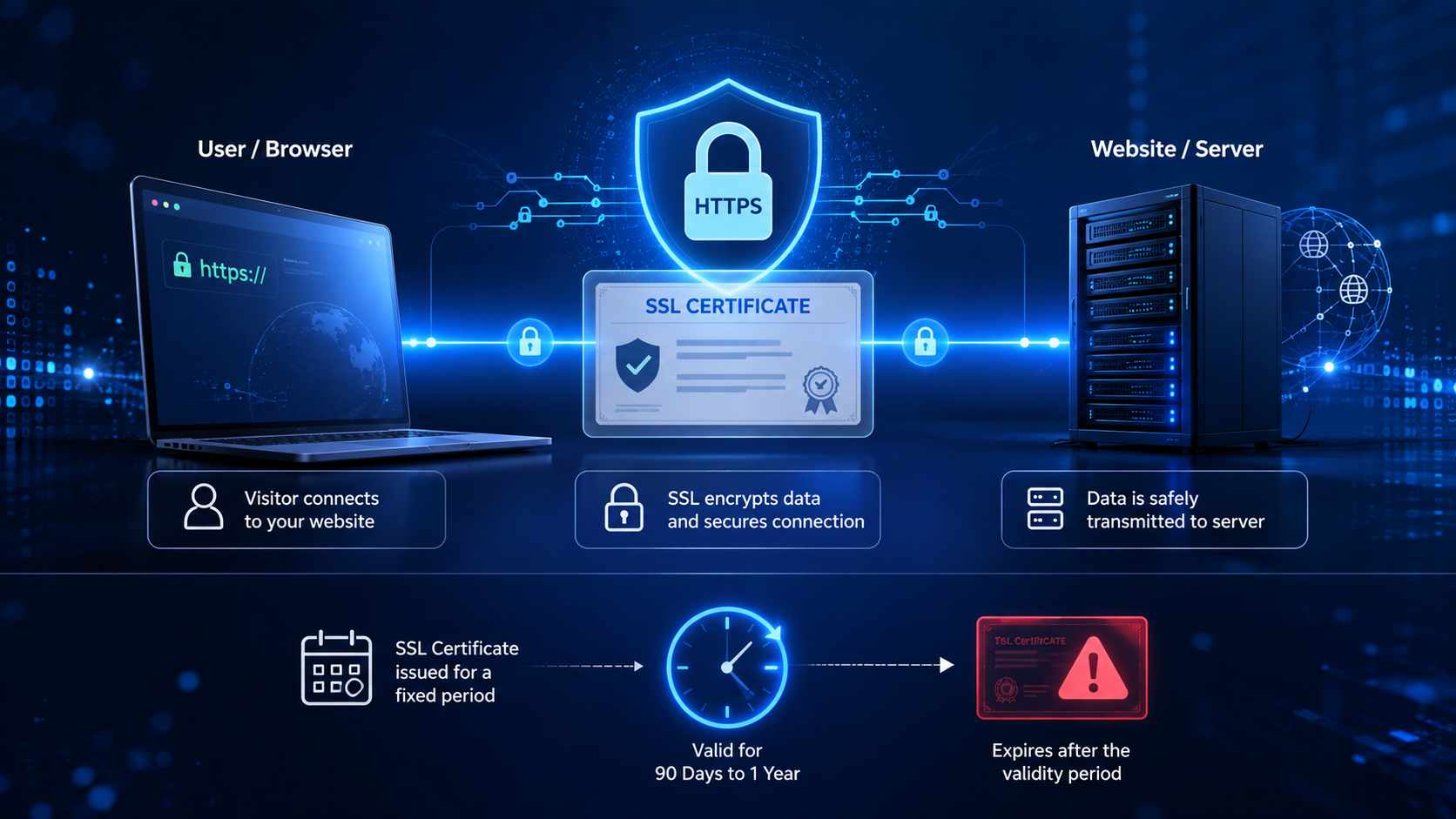
Before we get into the cost, let’s make sure we’re on the same page about what SSL actually is.
SSL stands for Secure Sockets Layer – though modern certificates technically use the successor protocol, TLS (Transport Layer Security). In practice, everyone still calls them SSL certificates. What they do is encrypt the data that travels between a website and its visitors: login credentials, payment information, contact form submissions, and more.
When a website has a valid SSL certificate, browsers display a padlock icon in the address bar and the URL begins with https://. This tells visitors: this connection is secure. You are safe here.
SSL certificates are not permanent. They are issued for a fixed period – typically 90 days to one year, depending on the certificate type and provider. When that period ends, the certificate expires. And when a certificate expires, browsers no longer consider the connection secure.
What happens next is where most people underestimate the damage.
The Clock Starts at Midnight
SSL certificates don’t expire gradually. The moment midnight hits on the expiry date, the certificate is invalid – instantly. There is no grace window from the browser’s perspective. The red warning appears immediately for every visitor who lands on the site.
The 5 Layers of Damage from an Expired SSL Certificate
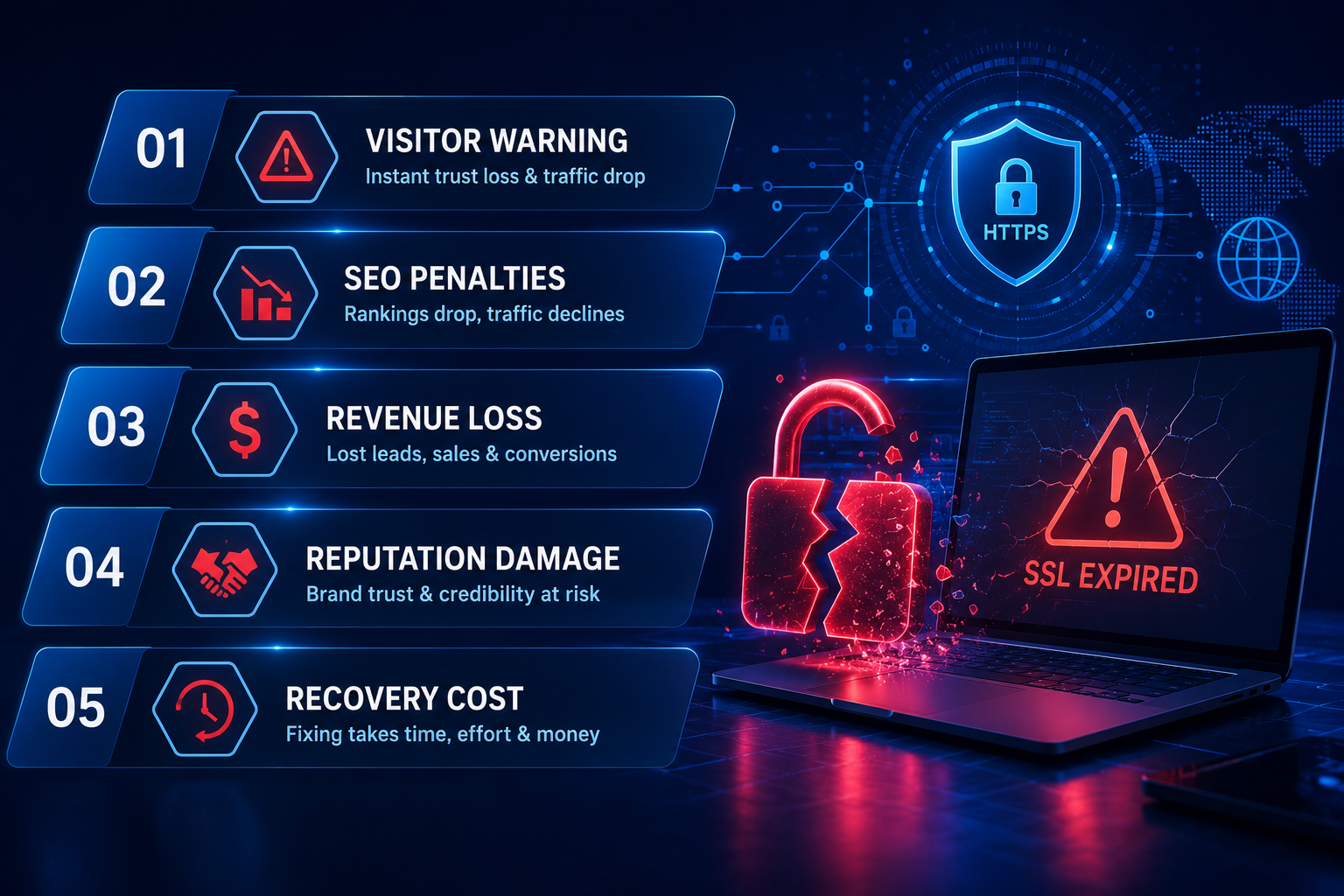
Most website owners are aware of Layer 1 – the browser warning. Very few are aware of Layers 2 through 5. And it’s Layers 2 through 5 that do the lasting damage.
Layer 1: The Browser Warning - Immediate Visitor Blockade
This is the one everyone knows about. When an SSL certificate expires, browsers like Google Chrome, Mozilla Firefox, Safari, and Microsoft Edge immediately display a full-page red warning screen to every visitor who tries to access the site.
The warning typically reads:
|
“Your connection is not private. Attackers might be trying to steal your information from this website.” |
That language is designed to scare people away – and it works. Studies consistently show that the overwhelming majority of visitors abandon a website the moment they see this warning. They do not click through. They do not give the benefit of the doubt. They leave.
For an e-commerce site, this means every visitor who lands on the site during the expiry window is a lost transaction. For a service business, every visitor is a lost enquiry. For a professional services firm, every visitor is a potential client who leaves with a deeply negative impression that is very difficult to undo.
Layer 2: SEO Damage - Google Penalises You Without Warning
Here is where most people get genuinely surprised. The damage from an expired SSL certificate does not stay contained within the visitor experience. It reaches into your search engine rankings – and it does so faster than most people realise.
Google has used HTTPS as a ranking signal since 2014. A site with a valid SSL certificate gets a positive signal; a site without one gets a negative signal. When your SSL expires, your site’s HTTPS status breaks – and Google’s crawlers notice.
Here is what happens to your SEO when SSL expires:
- Google’s bots detect the broken HTTPS and begin treating the site as insecure.
- Pages that were previously ranking begin to lose their position in search results.
- If the site goes offline (because some servers redirect broken HTTPS to nothing), Google begins de-indexing pages.
- Backlinks pointing to your HTTPS pages now point to a broken destination – leaking link equity.
- The longer the expiry goes undetected and unfixed, the deeper and harder to reverse the SEO damage becomes.
The cruel reality of SEO damage is that it is slow to accumulate and even slower to recover. A site that was offline or insecure for two weeks may take two to three months of consistent effort to fully recover its pre-expiry rankings. And in that recovery window, the business is losing organic traffic – and the leads and revenue that come with it – every single day.
AEO Note - How AI Search Engines View Expired SSL
Layer 3: Email Deliverability Breakdown
This one catches almost everyone off guard. Most people do not realise that SSL certificate issues can directly affect email deliverability – particularly for businesses using professional email hosted on the same domain.
When your SSL expires and your domain’s security posture is flagged as compromised, email providers (Gmail, Outlook, Yahoo) become more aggressive with their spam filters. Emails sent from your domain – proposals, invoices, client communications, automated notifications – are more likely to land in spam folders or be rejected entirely.
For a business that relies on email for sales, customer service, or client communication, this is a silent killer. Your emails appear to send normally from your end. But they never arrive. Or they arrive in spam folders that your recipients never check.
The business consequence? Proposals go unread. Invoices go unpaid. Client queries go unanswered. And the reputation of your sending domain – which email providers score and track over time – takes a hit that can persist for months after the SSL is renewed.
Layer 4: Client Trust - The Damage That Doesn't Show Up in Analytics
The browser warning, the SEO drop, and the email disruption are all measurable. What is harder to quantify – but arguably the most damaging – is what happens to client and customer trust.
When a visitor lands on a site showing ‘Not Secure,’ they do not think: ‘Oh, the SSL certificate must have expired – that’s a minor technical issue.’ They think: ‘This website is not safe. This company does not have its act together. I am not giving them my information or my money.’
For an agency managing client websites, this is existential. When a client’s website shows the red warning – even for a few hours – the client’s customers form a negative impression of the client. The client then forms a negative impression of you. The conversation that follows is never comfortable, regardless of how quickly you fix it.
“You never get a second chance to make a first impression online. An SSL warning is the digital equivalent of a broken front door on a professional office.”
– Web agency owner, reflecting on losing a client after an SSL expiry incident
Worse still: some clients don’t tell you immediately. They quietly begin looking for an alternative agency. By the time you find out – through their cancellation email three months later – the damage has long since been done.
Layer 5: Financial Cost - Direct Revenue Loss and Potential Legal Exposure
| Cost Category | Real-World Impact |
|---|---|
| Direct revenue loss | Every transaction, enquiry, or lead that bounces off the warning screen. For e-commerce sites, this can be thousands in lost sales per day. |
| SEO recovery cost | 3-6 months of additional SEO effort and/or paid advertising to recover lost organic rankings. Estimated ₹30,000-₹2,00,000+ depending on site scale. |
| Domain reclamation | If the domain itself expires alongside the SSL (a compounding failure), reclaiming a snatched domain can cost ₹50,000 to ₹5,00,000+ – or be impossible. |
| Email reputation repair | Re-establishing sender reputation after deliverability damage typically takes 4-8 weeks of careful, high-engagement sending. Revenue lost in that window is unrecoverable. |
| Client relationship damage | Difficult to quantify, but the cost of losing one mid-tier client over preventable technical failures is typically ₹1,00,000-₹5,00,000+ in annual recurring revenue. |
| Legal / compliance exposure | In regulated industries (healthcare, finance, legal), operating a website with broken encryption – even briefly – can trigger compliance violations with associated penalties. |
Why Does SSL Expiry Keep Happening? The Root Cause
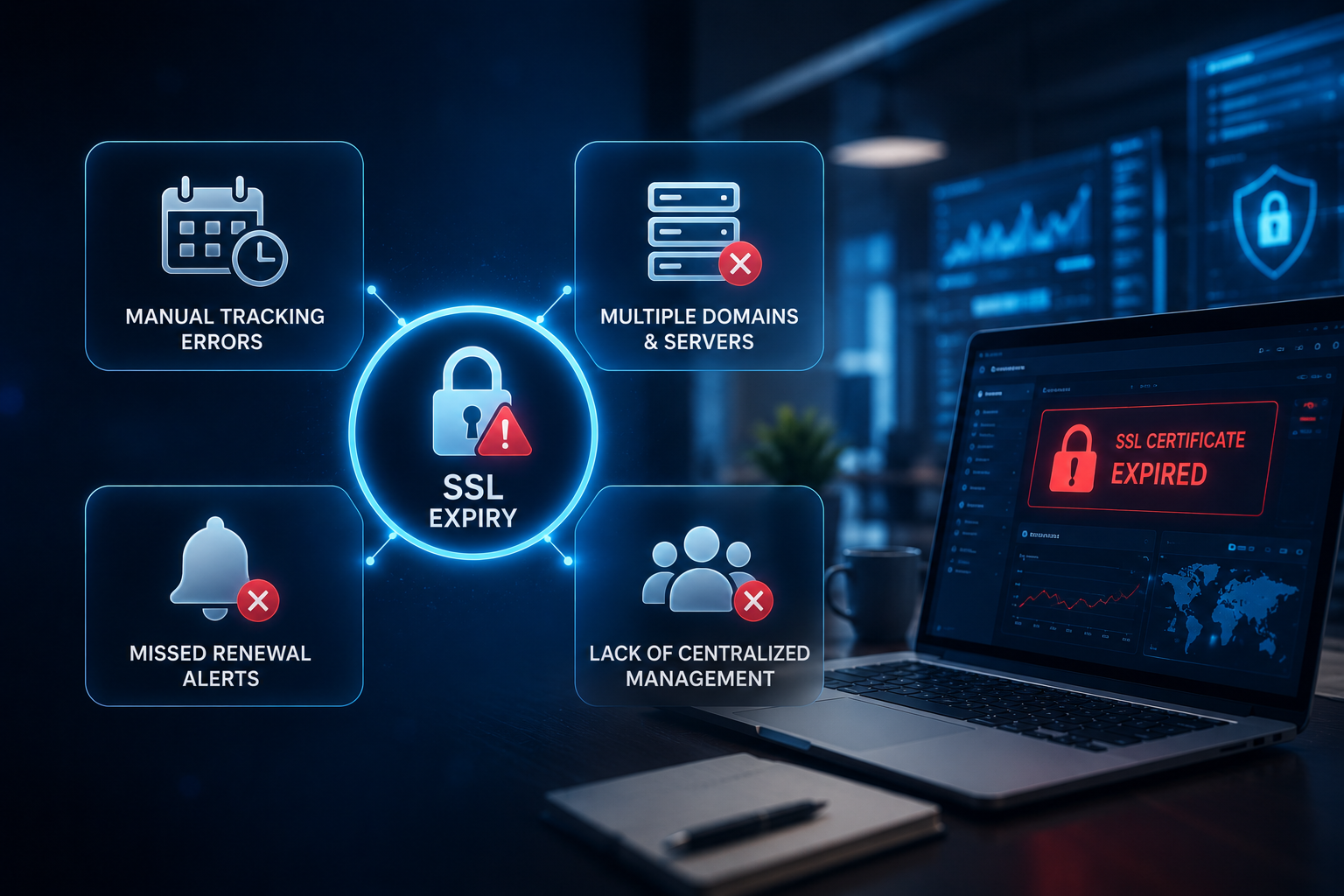
Given how serious the consequences are, it seems logical that every business would have a robust system to prevent SSL expiry. And yet it keeps happening – to large agencies, established businesses, and experienced developers alike.
The reason is not carelessness. It is a fundamental mismatch between the scale of the problem and the tools most people use to manage it.
- SSL certificates expire on different dates, from different providers, across different client accounts.
- Each certificate is managed through a different registrar or hosting panel login.
- Calendar reminders are set manually – and are easily missed, especially during busy periods.
- Spreadsheets go out of date the moment you close them.
- As client lists grow, the number of certificates to track multiplies – and the system that worked for 5 clients breaks at 20.
Manual tracking is not a scalable system. It is a liability that grows with every new client added to the roster.
The 48-Hour Window That Most People Don't Know About
Many SSL certificate providers send a renewal reminder email – but it often goes to the original registration email address, which may be an old inbox, a former team member’s account, or a generic address nobody monitors. By the time anyone realises the reminder was sent, the certificate has already expired. Automated monitoring that actively checks the certificate status – not just waits for an email – is the only reliable solution.
The Solution: Automated SSL Monitoring That Works While You Sleep

The good news is that this entire category of problem – SSL expiry damage, SEO setbacks, email disruption, client trust erosion – is completely preventable. Not with more spreadsheet columns or additional calendar reminders, but with automated monitoring that removes the human dependency entirely.
Here is what an effective SSL monitoring system does:
- Checks every SSL certificate daily – automatically. Not once a month when someone remembers. Every day, in the background, without any manual action.
- Provides a real-time dashboard showing the status of every domain you manage: Secure, Expiring Soon, or Not Secured – at a glance.
- Sends automated email alerts when a certificate is approaching expiry – typically 7 days in advance, giving plenty of time to renew before any visitor is affected.
- Tracks not just SSL, but domain registration, hosting contracts, and professional email accounts – because any one of these expiring can cause the same class of damage.
- Scales effortlessly – whether you manage 5 websites or 500, the monitoring system handles them all the same way.
What Happens When Monitoring Is In Place
The SSL monitor detects an expiring certificate 7 days before the deadline. An automated email alert is sent to the account holder. The certificate is renewed at a convenient time, with no urgency. The website never shows a warning. The client never knows there was ever a risk. The agency’s reputation stays intact. The SEO is completely unaffected.
This is not a hypothetical ideal. This is what automated SSL monitoring delivers, consistently, every time – for every domain in the system.
How Codxpert's SSL Monitor & Domain Manager Solves This - Completely

Codxpert built its SSL Monitor & Domain Manager specifically for agencies and businesses managing multiple websites – because the manual tracking problem is most acute and most dangerous at scale.
Here is what the platform does, practically:
SSL Certificate Monitoring
- Add any domain to the system - SSL data is fetched and displayed instantly: issuer, issue date, expiry date, and days remaining.
- Daily background scans check every certificate automatically - no manual action required.
- Real-time status indicators: green for secure, yellow for expiring within 30 days, red for expired or not secured.
- Automated email alert sent 7 days before any SSL certificate reaches expiry.
- One-click manual alert dispatch for on-demand digest reports.
Domain, Hosting & Email Management
- Track domain registration expiry dates per client - with automated 15-day advance alerts.
- Monitor hosting contract renewal dates - separately tracked, separately alerted.
- Link professional email accounts to each domain - in an expandable row - so email expiry is never missed.
- Color-coded dashboard - everything critical is highlighted in red. Nothing is hidden in a spreadsheet.
Built for Scale
- Manage 5 domains or 500 - the dashboard handles both without any change in workflow.
- AJAX-powered interface - add, update, or remove records in real-time without page reloads.
- Configured via SMTP - email alerts sent directly from your own mail infrastructure.
The Core Promise of Codxpert SSL Monitor
You should never find out that an SSL certificate has expired from a client phone call. You should find out from an automated alert 7 days earlier – with enough time to renew it quietly, before a single visitor is affected. That is exactly what this system delivers.
Ready to Make Sure This Never Happens to You?
Codxpert’s SSL Monitor & Domain Manager runs in the background – checking every SSL certificate daily, tracking every domain and hosting renewal, and sending you automated alerts before anything expires. Set it up once. Let it protect everything.
“The best time to set up SSL monitoring was when you built the website. The second best time is right now.”
FAQs (Frequently Asked Questions)
How quickly does an SSL warning appear after a certificate expires?
Immediately. The moment the certificate crosses its expiry timestamp – often at midnight – every major browser begins showing the full-page warning to visitors. There is no grace period from the browser’s perspective.
Can Google penalise my site for a brief SSL expiry - even if it's fixed within hours?
Yes. Google’s bots crawl sites continuously. If they encounter a broken HTTPS during an expiry window – even a short one – the crawl data is updated to reflect the insecure status. Rankings can begin to shift within 24 to 48 hours. Recovery depends on how quickly the fix is applied and how aggressively the site is re-crawled.
Do SSL certificate providers send renewal reminders?
Most do – but these reminders are unreliable as a sole safety net. They are sent to the email address used during initial setup (which may be an old or unmanned inbox), they can be filtered to spam, and they often fire too close to expiry to allow comfortable renewal. Active monitoring that checks the certificate’s actual status is far more reliable than waiting for a provider email.
My website has auto-renew enabled. Am I protected?
Partially. Auto-renewal relies on a valid payment method and an uninterrupted billing relationship with the provider. If the card on file expires, if the provider has a billing issue, or if the auto-renewal silently fails for any technical reason, the certificate will still expire – and you will have no warning unless you are actively monitoring it.
How many domains can an SSL monitoring tool manage?
A well-built SSL monitoring system should scale without limitation. Codxpert’s SSL Monitor handles any number of domains – from 5 to 500+ – with the same workflow. The dashboard displays all of them in one scrollable view with real-time status.
What is the difference between SSL certificate monitoring and domain monitoring?
SSL monitoring tracks the validity of the security certificate attached to a website – it prevents the ‘Not Secure’ browser warning. Domain monitoring tracks the registration status of the domain name itself – it prevents the domain from expiring and being purchased by someone else. Both are critical; both should be monitored together, which is exactly what Codxpert’s combined SSL Monitor and Domain Manager provides.
What is the difference between domain expiry and SSL expiry?
Domain expiry means the registration of the domain name itself – yourcompany.com – has lapsed. SSL expiry means the security certificate attached to the website has expired, causing browsers to show a ‘Not Secure’ warning. They are separate issues with separate expiry dates, separate providers, and separate consequences – though both can take a site offline or damage visitor trust. The safest approach is to monitor both simultaneously, which is exactly what Codxpert’s combined SSL Monitor and Domain Manager provides.

Shadab Alam
Founder of CodXpert • Co-Founder of Anterpreneur & Niagara Print Express
Shadab Alam is an entrepreneur, technology strategist, and the Founder of CodXpert, as well as Co-Founder of Anterpreneur and Niagara Print Express (NPE). With expertise in software engineering, artificial intelligence, SEO, digital transformation, and business strategy, he empowers businesses to innovate, automate processes, and accelerate sustainable growth through modern technology and data-driven solutions.
