

A domain name is the single most irreplaceable digital asset your client owns. Not their website design, not their hosting plan, not even their SSL certificate. The domain. Because everything else – the website, the email, the SEO equity, the brand identity – is built on top of it. And unlike every other digital asset, when a domain is lost, it can be permanently, irreversibly gone within hours.
For web agencies managing multiple clients, domain expiry management is not a background administrative task. It is one of the most consequential responsibilities in the entire client relationship. Get it right and it is invisible – the sign of a professional operation running smoothly. Get it wrong and it becomes a crisis conversation that can end a client relationship that took years to build.
This is the complete guide to doing it right. Not a quick-tip list – a genuine, comprehensive reference for agencies that manage domain assets professionally and want a system that scales without breaking, regardless of how many clients are in the portfolio.
What This Guide Covers
Every type of digital asset that expires alongside a domain – and why each one matters • The four most common domain management failure modes agencies experience • How to build a complete, scalable domain management system from scratch • The exact processes, alert thresholds, and monitoring tools that professional agencies use • How Codxpert’s Domain Manager delivers this entire system in one platform
Beyond the Domain: The Four Assets That Expire Together

Most guides to domain management focus exclusively on the domain registration itself. This is a significant blind spot. In practice, a client’s digital presence depends on four interconnected assets – each with its own expiry date, each from a potentially different provider, and each capable of causing serious damage when it lapses.
Understanding all four – and managing them together – is the foundation of professional domain expiry management.
Asset 1: Domain Registration
The domain registration is the rental agreement for the domain name itself – yourcompany.com, yourclinic.in, yourstore.org. It is registered through a domain registrar (GoDaddy, Namecheap, Google Domains, BigRock, and hundreds of others) for a fixed term, typically one to ten years.
When the registration lapses, the domain is no longer yours. Initially it enters a grace period managed by the registrar. But after that grace period – which varies by registrar and TLD – the domain is released to the public, where it can be purchased by anyone, including domain squatting bots that operate 24 hours a day.
The consequence of losing a domain is uniquely catastrophic because it is not just a technical failure – it is the loss of the digital address that all other assets are built on. A lost domain means a lost website, lost email, lost SEO equity, and potentially years of brand recognition attached to an address you can no longer access.
Asset 2: Web Hosting Contract
The web hosting contract is the agreement with the hosting provider to store and serve the website’s files, databases, and application code. Without active hosting, the website files exist but cannot be accessed – the site goes offline even if the domain is perfectly valid and the SSL certificate is current.
Hosting contracts are typically annual or monthly. Annual contracts are most common for established client sites, and they renew automatically – until a payment fails. When a hosting payment fails silently, the hosting provider typically gives a short grace period (often 7 to 14 days) before suspending the account. Account suspension takes the website offline instantly.
The particular danger of hosting expiry is that it is completely invisible to visitors and to external monitoring tools that only check the domain. The domain resolves. The SSL certificate is valid. But the website is offline because the hosting account is suspended. Diagnosing this takes longer than an SSL or domain issue – and the client experience during that diagnostic period is identical: broken website, confused visitors, angry phone call.
Asset 3: SSL Certificate
The SSL certificate is the security credential that encrypts data between the website and its visitors, and tells browsers to display the padlock icon and HTTPS prefix in the address bar. It is issued by a Certificate Authority (Let’s Encrypt, Comodo, DigiCert, and others) for a fixed validity period – 90 days for Let’s Encrypt, one year for most commercial certificates.
SSL expiry does not take the website offline – it makes the website actively hostile to visitors. Browsers display a full-page red warning screen advising visitors that the connection is not private and that their data may be at risk. The overwhelming majority of visitors leave immediately. Those who stay carry a lasting impression of an untrustworthy site.
For a comprehensive treatment of SSL expiry and its consequences, see our related guide: The Hidden Cost of an Expired SSL Certificate.
Asset 4: Professional Email Accounts
Professional email accounts – info@clientdomain.com, hello@clientbusiness.in, support@clientservice.com – are frequently the most overlooked expiry risk in an agency’s portfolio. They are set up once, often through Google Workspace, Microsoft 365, or a cPanel email server, and billed on their own independent schedule.
When a professional email account lapses, the consequences are immediate and comprehensive: inbound emails bounce with an error message to the sender, outbound emails fail to deliver, and the business loses its primary communication channel – sometimes without anyone inside the business realising for hours or days.
For client-facing businesses – a law firm, a medical practice, a retail store, a service agency – the inability to receive or send professional emails is a business-stopping event. And because email accounts are typically billed separately from domain and hosting, they are the most likely to fall outside a standard domain renewal process.
| Asset | Typical Expiry | What Breaks | Alert Threshold |
|---|---|---|---|
| Domain Registration | Annual (1-10 Years) | Website, email, and everything built on the domain. | 15 Days |
| Web Hosting Contract | Monthly or Annual | Website goes offline even with a valid domain and SSL. | 15 Days |
| SSL Certificate |
90 Days (Let’s Encrypt) or 1 Year (Commercial) |
Browsers display a “Not Secure” warning to all visitors. | 7 Days |
| Professional Email |
Monthly or Annual (Varies by provider) |
All email sending and receiving stops instantly. | 15 Days |
The Core Principle of Domain Expiry Management
The Four Failure Modes: How Domain Management Goes Wrong
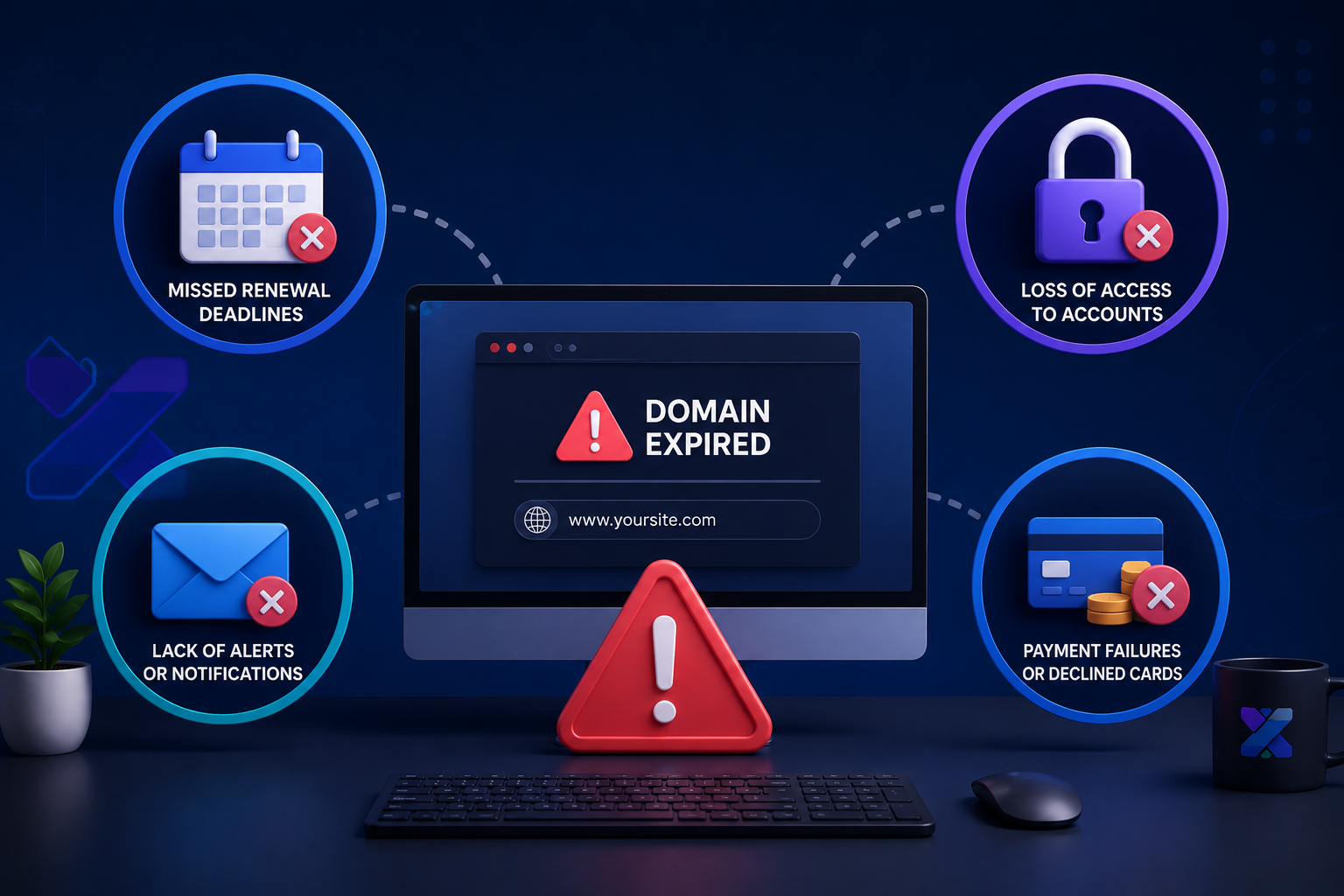
Based on how agencies most commonly experience domain and digital asset crises, four failure modes account for the vast majority of incidents. Understanding each one is the first step to structuring a system that prevents all of them.
Failure Mode 1: The Spreadsheet That Went Out of Date
This is the most common failure mode and the one that affects agencies of every size. A spreadsheet was created – carefully, professionally – at a point when the agency managed ten or fifteen clients. It tracked domain names, registrars, expiry dates, and renewal costs. It was accurate at the time.
Over months and years, the portfolio grew. New clients were added – sometimes to the spreadsheet, sometimes not. Renewal dates passed and the spreadsheet was not updated to reflect the new expiry year. A team member who maintained the spreadsheet left. The document became a historical record of what the situation was, not a live view of what the situation is.
When a domain lapses in this scenario, the agency often discovers the spreadsheet showed the domain as current – because it was, when the spreadsheet was last updated eighteen months ago.
The Trust Problem With Spreadsheets
A spreadsheet requires a human to update it every time something changes. SSL renewals, domain renewals, hosting upgrades, email account changes – every change requires a deliberate manual update. In a busy agency, this discipline is almost impossible to maintain consistently across a large portfolio. The spreadsheet is always at risk of being out of date in ways that are invisible until they cause an incident.
Failure Mode 2: The Auto-Renewal That Failed Silently
Auto-renewal is the most widely used domain management strategy among agencies that have moved beyond pure spreadsheet tracking. The logic is sound: configure every domain and hosting contract to auto-renew, ensure the payment method is current, and the problem is solved.
In practice, auto-renewal fails silently far more often than most agencies realise. Payment methods expire. Billing addresses change. Banks decline recurring charges without notifying the merchant. Registrars experience billing system errors. Hosting providers quietly change their auto-renewal terms.
When auto-renewal fails, the registrar or hosting provider typically sends an email – to the address on the account, which may be a former team member’s inbox, a generic email address that nobody actively monitors, or a client’s personal email that they have not mentioned to the agency. The email may also land in spam.
The agency has no visibility that the auto-renewal has failed. The first indication is typically a client call reporting a broken website – at which point the domain or hosting has already lapsed and the damage is already underway.
Failure Mode 3: The Client Who Managed Their Own Domain
Many agencies manage websites for clients who retain ownership and control of their domain registrations. This is the correct arrangement from a client rights perspective – clients should own their own digital assets. But it creates a management gap that is responsible for a significant number of domain expiry incidents.
The client receives the renewal reminder from their registrar. It may go to an email address they rarely check. It may be filtered as promotional content. They may mean to action it and not get around to it. They may be on holiday. Their accounts team may process invoices quarterly and miss the renewal date.
The agency, meanwhile, has no visibility into whether the renewal has been processed – until the website goes down and the client calls to ask why.
The professional solution is not to take ownership of client domains. It is to have an independent monitoring system that tracks the actual domain registration status regardless of who holds the registrar login – and alerts the agency 15 days before expiry so there is time to prompt the client to renew with ample buffer.
Failure Mode 4: The Asset That Was Never Tracked
This failure mode is the silent one: the asset that was never added to any tracking system in the first place. A hosting contract set up through a different provider than the main one. A secondary domain registered for a redirect. An email account added six months after the initial setup. A wildcard SSL certificate covering subdomains that nobody documented.
Every agency accumulates undocumented assets over time. The longer the client relationship and the larger the portfolio, the greater the probability that at least one asset is being managed outside any formal tracking system.
The only solution to this failure mode is a monitoring system that tracks assets based on their active status – not based on whether a human remembered to add them to a list.
“We discovered a hosting account for a client we had managed for six years had been running on a credit card that expired two years prior. It had been auto-renewing on a grandfathered billing arrangement that the provider eventually discontinued. We had no warning. The site went down on a Monday morning.”
– Agency director sharing a real portfolio management incident
Building a Complete Domain Management System: The Eight Components
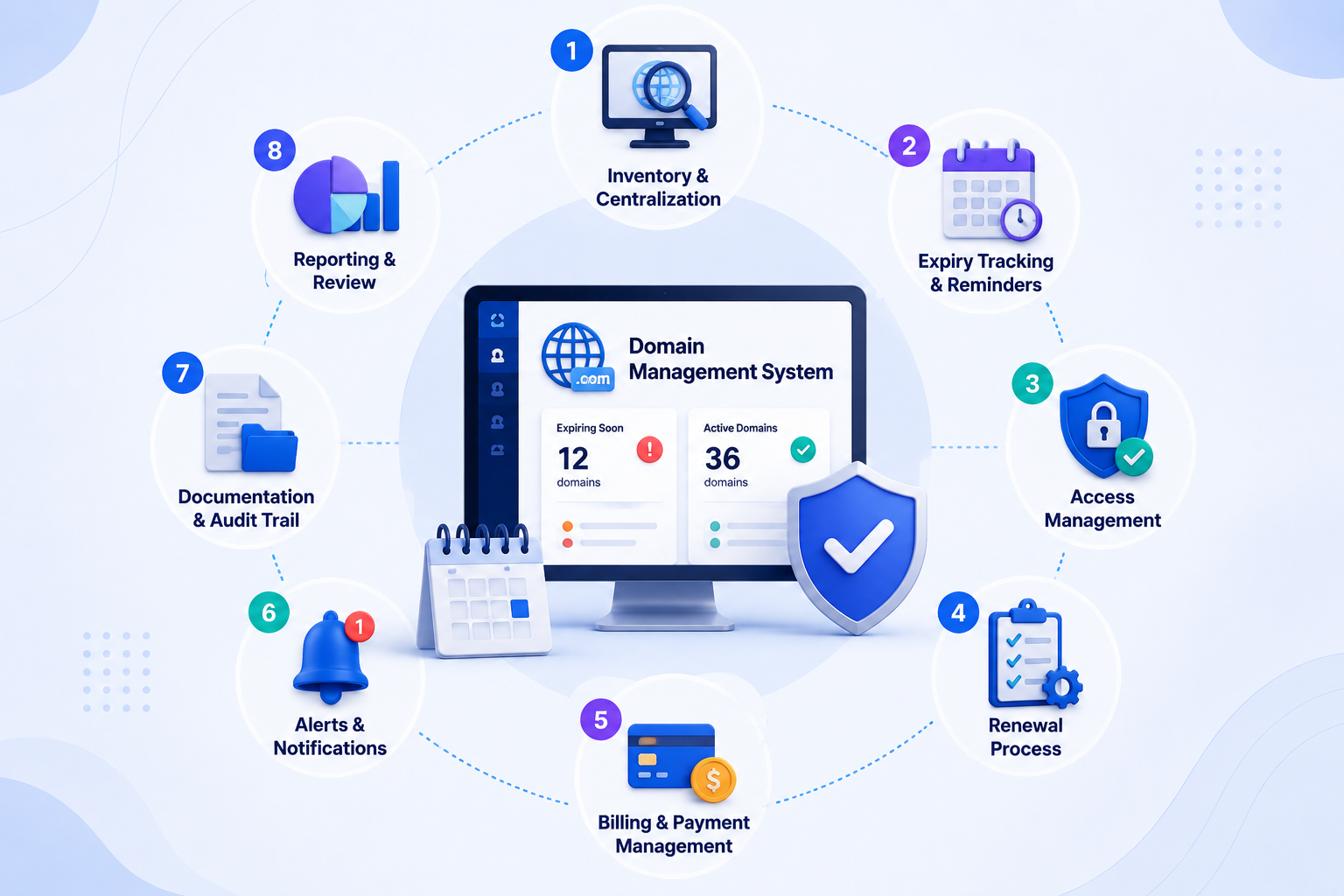
A complete domain expiry management system for a web agency is not a single tool or a single process. It is a combination of eight components that work together to ensure nothing expires undetected, regardless of who holds the registrar login, how many clients are in the portfolio, or how busy the team is in any given week.
Component 1: A Unified Asset Inventory
The starting point for any domain management system is a complete, accurate inventory of every digital asset under management – per client. Not just domains. Domains, hosting contracts, SSL certificates, and professional email accounts. All four. Per client. In one place.
Building this inventory for the first time requires a deliberate audit. For each client: identify every domain they own, the registrar for each, the hosting provider and contract type, the SSL certificate provider and type, and every professional email account and its provider. Document the expiry date for each asset and the login credentials or access pathway for renewal.
This audit typically takes two to four hours for a portfolio of twenty to thirty clients. It is almost always revealing – most agencies discover assets they were unaware of, or expiry dates that are significantly closer than expected.
Component 2: Active Daily Monitoring
The inventory is the starting point. Active daily monitoring is what keeps it accurate and actionable. Active monitoring means the system checks the actual status of each asset every day – not once a week when someone opens the spreadsheet, not when a renewal email arrives, but every single day, automatically.
For domain registrations, active monitoring means checking the actual WHOIS registration status. For SSL certificates, it means fetching the certificate from the domain and reading the expiry date directly. For hosting, it means monitoring whether the domain resolves correctly to a functioning server. These are active checks – not passive records of what the situation was when someone last updated a document.
Component 3: Tiered Alert Thresholds
Professional domain management uses tiered alert thresholds – multiple warnings at different points before expiry, each with a different urgency level and response expectation.
| Alert Tier | Threshold | Urgency | Expected Action |
|---|---|---|---|
| Early Warning | 30 days before expiry | Low | Note in weekly review. Confirm renewal is scheduled. |
| Action Alert | 15 days before expiry | Medium | Process renewal if not already done. Confirm with the client if they hold the login. |
| Critical Alert | 7 days before expiry | High | Renew immediately. Escalate if access issues prevent renewal. Notify the client proactively. |
| Emergency Alert | 1-3 days before expiry | Critical | All hands. Renew by any available means. Consider temporary alternatives if access is blocked. |
The 15-day action alert is the most operationally important threshold – it is the point at which the renewal must be actioned. The 30-day early warning exists to ensure the 15-day alert is never a surprise. The 7-day critical alert exists as a safety net for cases where the 15-day alert was not acted on. The 1-3 day emergency alert is the final backstop before genuine damage begins.
Component 4: Clear Ownership Per Asset
Every asset in the portfolio must have a clearly assigned owner – the person responsible for actioning renewal when an alert fires. This is not necessarily the person who holds the registrar login; it is the person who is accountable for ensuring the renewal is processed before the expiry date.
In practice, this means: for agency-owned or agency-managed assets, a named team member is the renewal owner. For client-owned assets, the renewal owner is the client contact – but the agency takes responsibility for alerting that contact at the 15-day threshold and following up if confirmation is not received by the 7-day threshold.
Component 5: Documented Renewal Processes
A renewal process document – per asset type, per provider – eliminates the time cost and error risk of figuring out how to renew something under pressure. Every agency should have documented processes for renewing domain registrations at the most common registrars in their portfolio, renewing hosting contracts at the most common hosting providers, renewing SSL certificates (both Let’s Encrypt automated renewal and manual commercial certificate renewal), and reactivating professional email accounts.
These documents do not need to be long – a step-by-step process for each scenario, with screenshots if helpful, accessible to any team member who might need to execute a renewal. The discipline of documenting the process also reveals the cases where access credentials are missing or unclear – better discovered in a calm review than during a crisis renewal.
Component 6: A Client Communication Protocol
For assets owned by clients, the agency needs a clear protocol for client communication around renewals: when to notify the client, what information to include, how to follow up if the client does not confirm renewal, and how to escalate if the domain is approaching expiry without renewal confirmation.
A professional client communication protocol includes a standard notification message sent at the 15-day threshold, a follow-up message at the 7-day threshold if renewal has not been confirmed, a phone call or urgent message at the 3-day threshold if there is still no confirmation, and a documented record of all communications for reference if a dispute arises.
This protocol does two things: it maximises the probability that client-owned assets are renewed on time, and it creates a clear record demonstrating that the agency fulfilled its notification responsibilities – which matters significantly if a client-owned domain lapses despite the agency’s efforts.
Component 7: Scalable Onboarding
Every new client that joins the agency represents a set of digital assets that need to be added to the monitoring system. The onboarding process for domain management should be standardised, fast, and non-negotiable – meaning that adding a new client’s assets to the tracking system is a defined step in the client onboarding workflow, not an optional follow-up task.
A well-designed monitoring system makes this fast. In Codxpert, adding a new domain takes under two minutes – the domain is entered, SSL data is fetched automatically, domain and hosting expiry dates are added manually, and alert thresholds are configured. The asset is monitored from the moment it is added. The onboarding step should be completed on Day 1 of the client relationship, not at some later point when there is time.
Component 8: Regular Portfolio Audits
Even with active daily monitoring, a quarterly portfolio audit is valuable – not to replace the monitoring, but to catch the category of asset that the monitoring system does not yet know about. The audit question is simple: is there any digital asset associated with any client in this portfolio that is not currently in the monitoring system? If the answer is yes, the asset is added immediately.
Quarterly audits also surface the less common scenarios: a client who has registered a new domain independently and not informed the agency, a hosting account that has been moved to a different provider, an email service that has been migrated mid-contract. These changes happen frequently in active client relationships and they represent the undocumented assets that are most vulnerable to lapsing undetected.
The Eight-Component System - Summary
1. Unified asset inventory – all four asset types, all clients, one place2. Active daily monitoring – not passive records, live status checks3. Tiered alert thresholds – 30 days, 15 days, 7 days, 1-3 days4. Clear ownership – named renewal owner for every asset5. Documented renewal processes – per asset type, per provider6. Client communication protocol – for client-owned assets7. Scalable onboarding – new client assets added on Day 18. Quarterly portfolio audits – catch the assets monitoring does not yet know about
How Codxpert's Domain Manager Implements This System

Codxpert’s Domain Manager was built to deliver every component of the eight-part system described above – in a single platform, without requiring technical setup or ongoing manual maintenance from the team.
Unified Dashboard - All Four Assets Per Client
Every client entry in Codxpert’s Domain Manager contains the domain registration, the hosting contract, the linked SSL certificate status (pulled from the SSL Monitor), and the associated professional email accounts – all in one expandable row. The dashboard gives a complete picture of every client’s digital asset health in a single scrollable view.
Color coding makes the status immediately legible: green for assets that are current and healthy, yellow for assets expiring within 30 days, red for assets expiring within 15 days or already lapsed. At a glance – in under ten seconds – the entire portfolio status is visible.
Active Daily Scanning
Codxpert runs a background scan of every asset in the system every day. SSL certificate status is fetched directly from the domain – reading the actual certificate, not a stored date. Domain registration status is checked via WHOIS. Hosting contract dates are tracked against the dates entered and alerted on schedule. No manual refresh is required. The system updates continuously.
Automated Alerts at 15 Days and 7 Days
Domain registration and hosting contract alerts fire automatically at 15 days before expiry. SSL certificate alerts fire at 7 days. All alerts are sent to the configured SMTP email address – meaning they go to a monitored inbox, not a registrar’s notification system that may be filtered or ignored.
A manual ‘Send Alert Now’ button allows the team to dispatch an immediate digest report at any time – useful for weekly reviews, for client reporting, or for confirming that alert configuration is working correctly when onboarding a new client.
Professional Email Tracking Per Domain
Each domain entry in the Domain Manager has an expandable section for professional email accounts. Email account names, providers, and expiry dates are tracked alongside the domain – in the same row, in the same dashboard, with the same alert system. This is the component most commonly missing from other domain tracking approaches, and the one most likely to prevent the silent email account lapse that blindsides both agencies and their clients.
New Client Onboarding in Under 5 Minutes
Adding a new client to Codxpert’s Domain Manager takes under five minutes for a typical client with one domain, one hosting contract, an SSL certificate, and two or three professional email accounts. The domain entry is created, the SSL data is fetched automatically, the hosting and email expiry dates are added, and the alerts are configured. From that point, the client’s entire digital asset portfolio is monitored daily and will alert at the appropriate thresholds without any further action.
A Note on Client-Owned Domains
Codxpert’s Domain Manager tracks the expiry status of client-owned domains regardless of who holds the registrar login. The monitoring reads the domain’s actual registration status – not an internal record – so it alerts the agency accurately even for domains the client manages independently. This gives agencies the visibility they need to prompt clients proactively, while respecting the client’s ownership of their own digital assets.
Domain Management Is a Professional Obligation, Not an Administrative Task

Every client relationship a web agency builds rests on an implicit promise: we will manage your digital presence professionally. That promise includes – necessarily – ensuring that the domain their website lives on, the hosting their files are stored on, the SSL certificate their visitors rely on, and the email accounts their business communicates through are all current, valid, and will not expire without warning.
Meeting that promise with a spreadsheet and calendar reminders is possible when a portfolio is small. It becomes increasingly unreliable as the portfolio grows, increasingly stressful for the team managing it, and increasingly risky for the client relationships that depend on it.
The eight-component system described in this guide is what professional domain management looks like – not aspirationally, but practically. Each component addresses a specific failure mode. Together they create a system that scales, that does not depend on human memory or manual discipline to function, and that alerts the right person with the right information at the right time – consistently, for every asset, across every client.
The agencies that build this system do not have domain expiry incidents. Not because they are more careful than other agencies – but because they have built a system that makes careful unnecessary. The system is careful for them, every day, automatically.
“The measure of a professional agency is not what it does when things go wrong. It is the system it has in place to ensure they never go wrong in the first place.”
– Codxpert
Build Your Complete Domain Management System Today
Codxpert’s Domain Manager gives your agency a unified dashboard for every client’s domain registration, hosting contract, SSL certificate, and professional email accounts – with automated daily monitoring and tiered alerts at 15 days and 7 days. Everything in this guide, delivered in one platform.
Add a new client in under 5 minutes. Monitor everything automatically. Never miss a renewal.
FAQs (Frequently Asked Questions)
How should a web agency manage domains owned by their clients?
The professional approach is to maintain monitoring visibility of client-owned domains without taking over the login credentials. This means using an active monitoring system that checks the actual domain registration status daily and alerts the agency at the 15-day threshold – giving enough time to contact the client and prompt renewal before any damage occurs. The agency does not need registrar access to monitor; it needs a monitoring system that reads the domain’s live status independently.
What is the correct alert threshold for domain renewal reminders?
Fifteen days is the professional standard for domain renewal alerts – it provides a two-week window for the renewal to be processed, even accounting for client response delays, access issues, or payment processing time. Some agencies add a 30-day early warning as an informational alert and a 7-day critical alert as a final backstop. The minimum acceptable alert is 7 days; anything shorter does not provide a comfortable buffer for resolving access issues or client communication delays.
How do I track domain expiry for a large number of clients?
A dedicated domain monitoring platform that checks registration status actively – not a spreadsheet or calendar reminder system – is the only reliable approach at scale. The key capabilities to look for: automatic daily status checks, multi-asset tracking per client (domain, hosting, SSL, email), tiered alerts at multiple thresholds, and a scalable onboarding process that takes under five minutes per new client. Codxpert’s Domain Manager provides all of these in a single platform.
What happens to a website when the hosting contract expires, not the domain?
When a hosting contract lapses, the hosting provider typically suspends the account after a short grace period (often 7 to 14 days). Account suspension takes the website offline immediately – even if the domain registration is current and the SSL certificate is valid. From a visitor’s perspective, the effect is identical to a domain expiry: the site is unreachable. Diagnosing the cause (hosting vs domain vs SSL) takes time, during which the client’s business is offline and the agency is under pressure. This is why hosting contracts must be tracked alongside domain registrations – not separately.
Should I use the same registrar for all client domains to simplify management?
Consolidating client domains at a single registrar simplifies the login management aspect of renewal, but it is not a substitute for active monitoring. A single-registrar approach does not eliminate the risk of auto-renewal failure, does not track hosting or email assets, and does not give the agency live visibility into registration status. It should be considered a complementary practice, not a management system. Active monitoring is required regardless of registrar consolidation.
How do I handle a domain that has already entered the redemption period?
Act immediately. Contact the registrar directly – by phone if possible – to initiate the redemption process. Redemption fees vary by registrar and TLD but typically range from ₹5,000 to ₹30,000 on top of the standard renewal fee. Prepare the client for the cost and the timeline – redemption processing can take 24 to 72 hours. While the domain is in redemption, communicate proactively with the client about the status and expected resolution time. Document all communications. Once recovered, audit how the domain entered the redemption period and implement monitoring to ensure it cannot happen again.

Shadab Alam
Founder of CodXpert • Co-Founder of Anterpreneur & Niagara Print Express
Shadab Alam is an entrepreneur, technology strategist, and the Founder of CodXpert, as well as Co-Founder of Anterpreneur and Niagara Print Express (NPE). With expertise in software engineering, artificial intelligence, SEO, digital transformation, and business strategy, he empowers businesses to innovate, automate processes, and accelerate sustainable growth through modern technology and data-driven solutions.